Recover your missed FBA discrepancies effortlessly
SellerCycle reconciles your Amazon reports with your warehouse scans, documents each faulty return with photo evidence, and prepares the reimbursement claim request for you.
Almost every FBA seller loses 1-3% of their revenue to faulty returns & errors*
The good part is that Amazon has policies to reimburse sellers for these legitimate discrepancies. The problem is that the process is complex, time-consuming, and can easily go unnoticed, so many sellers leave money they are entitled to on the table.
Returns never received
The customer gets refunded, but the returned unit never makes it back to your warehouse.
Items missing inside
Returns arrive incomplete, missing parts or accessories, and you’re left to absorb the wrongful loss.
A different item inside
Returns can come back used, damaged, swapped, or simply the wrong item, and the customer still gets refunded.
Any many more...
Like the removal order had missing items, the claim window expired, totally damaged items received, etc.
We Eliminate the Complexity, bring Transparency & Efficiency
Set it up once. Then let it recover your money effortlessly
Your team inspects the return. SellerCycle documents everything. File the claim yourself or let us handle it.
Inspect returns at any warehouse
Scan the LPN, weigh it, photograph it, tag the condition. Takes a few minutes per unit for the inspection.
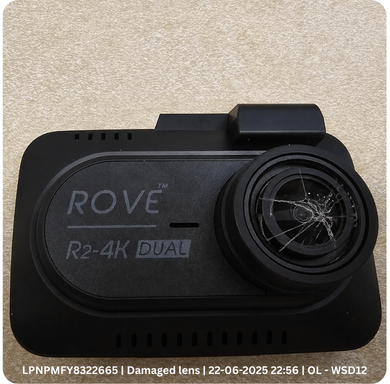

Evidence captured on the spot
Every scan bundles photo, timestamp and warehouse ID - the proof Amazon requires, attached automatically.
File with the evidence attached
Cases are drafted with photos, LPNs and the policy citation, then filed through Seller Central. Approve in a click or leave it to automatic attribution.
Choose between managed and unmanaged
Same detection engine either way. The difference is who files the case - a dedicated SellerCycle specialist, or you.
We detect and we file for you.
A dedicated, trained reimbursement specialist owns your reimbursement cycle end to end. You get peace of mind and stay focused on growing your business.
We detect. You file the case.
SellerCycle flags every discrepancy and hands you a drafted case with the evidence attached. Your team submits it in Seller Central on your own schedule.
Detection is automated. Filing is done by a person.
Amazon does not permit automated case submission. Our engine finds and documents the discrepancy, then a trained specialist files it manually through Seller Central on the Managed plan, or your team can file it on the Self-Managed plan. No bots, no scraping, no account risk.
Read-only access to four report types. Nothing written back to your account.
Cases go in through the standard Seller Central process, by hand, one at a time.
Reimbursements already issued are recognised and set aside before anything is filed.
Every case keeps its photo, LPN and timestamp, exportable at any time.
See your recovery potential
Sellers who scan and reconcile systematically recover 1-3% of their monthly revenue. Move the slider to estimate the range for your monthly revenue.*
*Based on aggregated data across SellerCycle managed accounts.
*This is a rough estimate. The final reimbursement amount may vary based on your actual business operations and eligible claims. Results vary by account history, category and Amazon policy in force at the time of filing.

"We were eating about $8K a month in returns that nobody looked at. Half of it turned out to be customers sending back the wrong thing. SellerCycle helped us document those and file the claim with policy citation and evidence effortlessly."
Expert Insights from the SellerCycle Team
What we learn filing return-inspection cases every day, written up for the people running FBA brands.


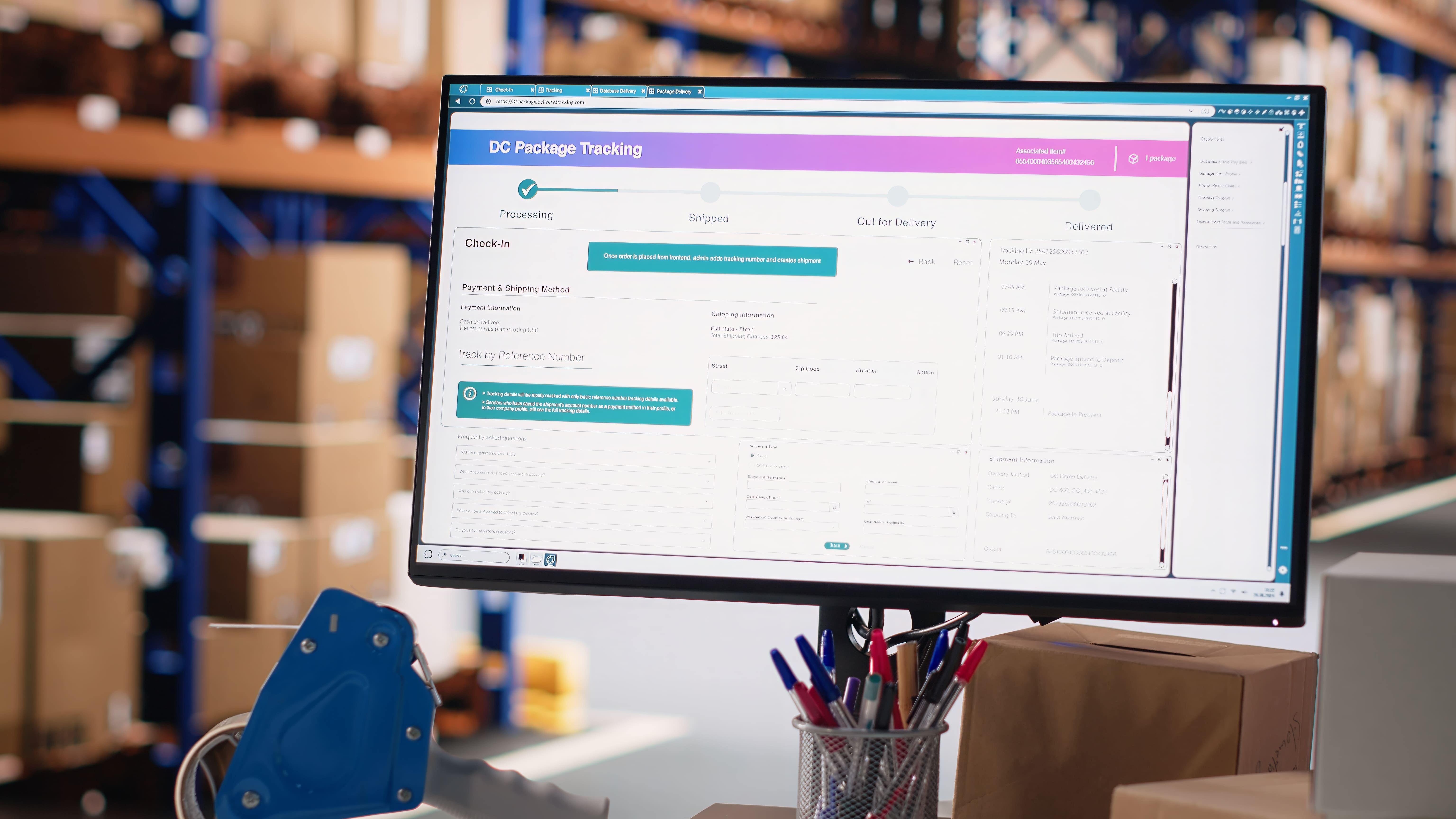
Turn missed Amazon reimbursements into growth capital
Connect your seller account once and claim eligible reimbursements into recovered revenue.
From a returned unit on the dock to a reimbursement in your account.
Five things happen each time a return reaches your warehouse.
Each return is scanned and photographed.
The worker scans the LPN, takes a photo, and taps the condition. Everything a reimbursement request needs is captured at that moment.
Five report types line up against your scan data.
Returns, removals, inventory adjustments, and issued reimbursements are pulled from SP-API and matched line by line against what your warehouse recorded. Anywhere the records differ, SellerCycle prepares a documented request.
Each request carries the photo, the LPN, and the exact amount.
SellerCycle drafts each request with the relevant policy reference, LPN, order ID, photo evidence, shipment ID, reimbursement amount, and other required details, then generates a complete claim ready case draft to file by your team or a SellerCycle specialist.
The case is filed in Seller Central with the evidence attached.
A SellerCycle specialist submits the case for you on a managed plan, or your team approves and files it in a click. Either way it goes in complete, within the claim window, and with the photo evidence attached.
A live record follows every request through to resolution.
See what has been recovered, what is in progress, and what is ready for review in a single dashboard.
Try it on your own returnsOne flat price. You choose who files the case.
Both plans run the same detection engine at the same price. The difference is who files the case.
A dedicated, trained reimbursement specialist files every case manually in Seller Central and follows it end to end, so recovery runs without your team.
We detect and draft every case with its evidence. Your team files in Seller Central and keeps full control. You still get an account manager who can guide you.
For larger brands operating multi-tenant, with SLA, SSO, custom pricing, a dedicated CSM and white-glove onboarding.
What sellers ask before signing up.
Anything else? Fill in the contact form or email us at support@sellercycle.ai, we usually reply within a business day during business hours (PT).
How does the SP-API connection work?
What happens if we cancel?
Can any FBA seller use it?
Do I get an account manager who guides me?
Does my warehouse staff have to provide you the inspected images?
Set up in few minutes.
Create an account, authorise the read-only connection, and reconciliation starts as soon as you start the scan process.
Create your account
Continue with GoogleLet's look at your returns together.
Tell us how you operate and we will walk you through what SellerCycle would prepare for your account, managed or self-managed.
Thanks, we have your details.
We will reply to {{ salesEmailLabel }} with a time to talk and what we would need to review your account.
Send another enquiryTell us about your account
Only your email is required.
The FBA reimbursement guide
A plain-language walkthrough of what Amazon reimburses on returns, what evidence supports a case, and how the claim windows work.
What reimbursements cover
Amazon operates a reimbursement policy for FBA sellers covering situations where a returned unit does not come back to you in the state the refund assumed. Each case is reviewed against the information the seller supplies, which is why documentation matters more than volume.
What makes a case straightforward to review
A reviewer needs to see what arrived, when it arrived, and how it differs from what was expected. Four pieces of information carry most of that weight.
Timing and claim windows
Each case stays eligible for a limited period after the return or refund date. Cases filed inside that window are reviewed normally; cases filed after it are not. This is the most common reason a legitimate case goes unrecovered, and the reason SellerCycle reconciles every four hours rather than monthly.
Building the habit into your warehouse
The practical change is small: photograph every FBA return at the moment it is scanned, before it is restocked or moved. Once that habit exists, every case you file already has its evidence attached, and reconciliation becomes a review task rather than an investigation.
SellerCycle handles the reconciliation and the documentation for you.
Connecting your Seller account
What the read-only connection asks for, how to authorise it, and what happens on the first reconciliation cycle.
Step 1 - Create your SellerCycle account
Sign up with a work email and your company name. No card is required for the trial, and nothing is charged until you choose a plan.
Step 2 - Authorise the connection
From Seller Central you authorise SellerCycle through the standard app permissions screen. The connection is read-only, and we request four report scopes and nothing else.
We never request write access to listings, pricing, or inventory, and you can revoke the authorisation from Seller Central at any time.
Step 3 - Add your warehouse
Install the scanner app on any phone at the receiving station and add a warehouse staff account. Warehouse staff scan and photograph returns without seeing financial data.
Step 4 - Collect evidence & file the case
Reconciliation begins immediately and includes a lookback across all the removal orders. Cases appear with their evidence attached, filed by our dedicated SellerCycle Reimbursement specialist on the managed plan, or by your team on self-managed.
14-day free trial, complimentary training, and an account manager walks you through it.
Answers to common questions
Account, connection, evidence and billing. If something is not covered here, the team replies to email within the hour during business hours PT.
How long does setup take?
What is the difference between managed and self-managed?
Is this safe for our Amazon account standing?
Who takes the photographs?
Can our warehouse staff use the scanner app?
Which marketplaces are supported?
How does billing work?
What happens to our data if we leave?
Privacy notice
How SellerCycle collects, uses, discloses and deletes information, including the disclosures and rights required by California law.
1. Who we are and how to reach us
SellerCycle, Inc. ("SellerCycle", "we", "us") provides reimbursement reconciliation software and a managed filing service for Amazon FBA sellers. We are the business responsible for the personal information described here. Write to support@sellercycle.ai, or by post to SellerCycle, Inc., [street address], California, United States.
2. Notice at collection
We collect the categories of personal information listed below, use them for the business purposes stated, and retain them for the periods described in section 8. We do not sell personal information, and we do not share it for cross-context behavioural advertising.
We do not knowingly collect sensitive personal information as defined by the CPRA, we do not collect biometric or precise geolocation data beyond the warehouse identifier attached to a scan, and we do not knowingly collect information from anyone under 16.
3. How we use personal information
Where we rely on consent, for example non-essential analytics cookies or marketing email, you may withdraw it at any time without affecting the lawfulness of processing already carried out.
4. Where the information comes from
Directly from you and your team, from your authorised Amazon Selling Partner API connection, from your warehouse operators using the scanner app, and from our service providers for payment, email delivery and security telemetry.
5. Disclosure to service providers
We disclose personal information to service providers and contractors solely to perform services for us, under written contracts that restrict them to those purposes. These include cloud hosting, payment processing, email delivery, error monitoring and customer support tooling. We also disclose information where required by law, in response to valid legal process that we review before responding, and to a successor in the event of a merger or acquisition.
6. Your Amazon connection
The Selling Partner API connection you authorise is read-only and limited to returns, removal, reimbursement and inventory reports. We do not request write access to listings, pricing or inventory, and you can revoke the authorisation from Seller Central at any time. Data obtained through the connection is used only to provide the service to you, and is never pooled for the benefit of another customer.
7. Storage, security and international transfers
Data is encrypted in transit with TLS 1.3 and at rest with AES-256, and is hosted in the United States. Internal access is restricted to staff who require it for delivery, support or security, and is logged. Managed-service specialists may work from outside the United States; where they do, transfers are governed by contractual safeguards and access is limited to the case data required to file on your behalf. No method of transmission or storage is completely secure, and we cannot guarantee absolute security.
8. Retention
Account records are retained for the life of the subscription and for 90 days after cancellation, then deleted. Case and evidence records are retained while the related claim is open and for 90 days after it resolves or after cancellation, whichever is later. Billing records are retained for seven years to meet tax and accounting requirements. Security logs are retained for 12 months.
9. California privacy rights
If you are a California resident you have the following rights under the CCPA as amended, and equivalent rights exist in other U.S. states with comprehensive privacy laws.
To make a request, email support@sellercycle.ai from the address on your account, or write to the postal address in section 1. We will verify your identity against account records before acting, acknowledge within 10 business days, and respond within 45 calendar days, extendable once by a further 45 days where necessary. An authorised agent may act for you with written permission and proof of identity.
10. Shine the Light
Under California Civil Code section 1798.83, California residents may request details of personal information disclosed to third parties for their direct marketing purposes. We do not make such disclosures. Requests may be sent to support@sellercycle.ai.
11. Cookies and analytics
We use strictly necessary cookies to keep you signed in and to protect the application, and a limited set of first-party analytics to understand product usage. We do not run advertising cookies or third-party ad trackers. Refusing non-essential cookies does not restrict access to the product. We honour Global Privacy Control signals where your browser sends them.
12. Children
The service is sold to businesses and is not directed to children. We do not knowingly collect personal information from anyone under 16. If you believe a child has provided information, write to support@sellercycle.ai and we will delete it.
13. Changes to this notice
We will post any revised notice on this page with a new effective date, and will notify account owners by email before a material change takes effect.
Terms of service
The agreement between you and SellerCycle, Inc. for the platform and the managed filing service.
1. Agreement to terms
These terms form an agreement between SellerCycle, Inc., a Delaware corporation with its principal place of business in California ("SellerCycle"), and the company on whose behalf you create an account ("you"). By creating an account, authorising an Amazon connection, or using the service, you accept these terms. If you are accepting on behalf of a company, you confirm you have authority to bind it.
2. The service
SellerCycle reconciles your Amazon FBA reports against your own warehouse records, identifies discrepancies that may be eligible for reimbursement under Amazon policy, and prepares each case with supporting evidence. On the self-managed plan you review and file the prepared cases yourself. On the managed plan a trained specialist assigned to your account files each case manually through Amazon Seller Central and follows it to resolution on your behalf.
3. How cases are filed
Cases are prepared by our detection and documentation engine and submitted manually by a human specialist through the standard Seller Central case process. We do not use bots, automated submission, or screen scraping against Seller Central, and we do not access your Seller Central account other than through the read-only Selling Partner API connection you authorise and, on the managed plan, the account access you expressly provide for filing.
4. No guarantee of outcome
Reimbursement decisions rest solely with Amazon. SellerCycle does not guarantee any recovery amount, approval rate, or timeline, and results vary with account history, marketplace, category, and Amazon policy in force at the time of filing. Any figure shown in the product, in the recovery estimator, or on this website is an illustration based on aggregate experience, not a representation about your account.
5. Relationship with Amazon
SellerCycle is an independent software provider. We are not affiliated with, sponsored by, endorsed by, or an agent of Amazon.com, Inc. or its affiliates. Amazon, FBA, and Seller Central are trademarks of Amazon.com, Inc. Your use of Amazon services remains governed by your own agreements with Amazon.
6. Your account and responsibilities
7. Acceptable use
Our acceptable use policy is incorporated into these terms by reference. You may not resell or white-label the service without a written agreement, reverse engineer or copy the platform, submit records you did not capture or that you know to be inaccurate, or use the service to file cases for an account you are not authorised to act for.
8. Fees, commission and taxes
Subscriptions are $49 per month, or $41 per month billed annually where two months are free. On the managed plan a commission of 5% applies to reimbursed amounts actually received into your Seller account. Subscription fees are charged in advance; commission is invoiced in arrears against reimbursements received in the prior period. Prices exclude sales and use taxes, which are added where applicable. You are responsible for all taxes associated with your use of the service other than taxes on our net income.
9. Automatic renewal and cancellation
Subscriptions renew automatically for successive terms of the same length until cancelled, at the rate then disclosed for your plan. You may cancel at any time from account settings or by emailing support@sellercycle.ai, and cancellation takes effect at the end of the current paid term. Consistent with California law we disclose the renewal terms at signup, obtain your affirmative consent, send an acknowledgement you can retain, and provide cancellation instructions in-product. Refunds are governed by our refund and cancellation policy.
10. Trial
The trial runs 14 days and requires no card. If you choose a plan at the end of it, billing begins on the date you subscribe and renews as described in section 9.
11. Your data and our licence to use it
You retain all right, title and interest in your account, report and warehouse data. You grant us a non-exclusive licence to host, process and transmit that data solely to provide, secure and support the service, including preparing and filing cases on your behalf. We may use aggregated, de-identified statistics that do not identify you or your business to operate and improve the service. Personal data is handled as described in our privacy notice.
12. Confidentiality
Each party will protect the other party non-public information with at least reasonable care and use it only for the purposes of this agreement. This obligation survives termination for three years.
13. Warranties and disclaimers
We provide the service with reasonable skill and care. Except as expressly stated, the service is provided "as is" and "as available", and to the fullest extent permitted by law we disclaim all other warranties, express or implied, including merchantability, fitness for a particular purpose, non-infringement, and any warranty that the service will be uninterrupted, error-free, or will result in any particular reimbursement.
14. Dispute resolution, arbitration and class waiver
We will first try to resolve any dispute informally: write to support@sellercycle.ai with a description of the dispute and the relief sought, and we will attempt to resolve it within 30 days. If that fails, any dispute arising out of or relating to these terms or the service will be resolved by binding arbitration administered by JAMS under its Streamlined Arbitration Rules, seated in California, before a single arbitrator, with judgment enforceable in any court of competent jurisdiction.
Each party waives any right to bring or participate in a class, collective, consolidated or representative action, and the arbitrator may not consolidate claims or preside over any form of representative proceeding. Either party may bring an individual claim in small claims court instead of arbitration, and either party may seek injunctive relief in court to protect intellectual property or confidential information. If the class waiver is held unenforceable, the arbitration agreement is void as to that claim.
15. Limitation of liability
To the fullest extent permitted by law, neither party is liable for indirect, incidental, special, consequential, exemplary or punitive damages, or for lost profits, lost revenue, lost reimbursements, or loss of data, whether or not foreseeable. Our aggregate liability arising out of or relating to this agreement will not exceed the greater of the fees you paid to us in the 12 months preceding the event giving rise to the claim, or one hundred U.S. dollars. Nothing in this section limits liability that cannot be limited by law.
16. Indemnity
You will defend and indemnify SellerCycle against third-party claims arising from your data, your warehouse records, your use of the service in breach of these terms or applicable law, or your relationship with Amazon, and from any claim that a case filed on your instruction contained information you supplied that was inaccurate.
17. Suspension and termination
Either party may terminate for material breach that is not cured within 30 days of written notice. We may suspend access immediately where required to protect the service, other customers, or to comply with law, and will restore it as soon as the cause is resolved. On termination your connection pauses, cases already submitted continue to be tracked to resolution, commission already earned remains payable, and data is handled as described in our privacy notice.
18. Changes to the service and to these terms
We may change the service so long as we do not materially reduce core functionality during a paid term. We may update these terms, and will give account owners at least 30 days notice by email of material changes. Continued use after the effective date constitutes acceptance; if you do not accept, you may cancel and receive a pro-rata refund of prepaid fees for the unused remainder of the term.
19. California consumer rights notice
Under California Civil Code section 1789.3, California users are entitled to the following notice: the provider of this service is SellerCycle, Inc., [street address], California, United States. Pricing is shown during the ordering process and in your account. To file a complaint or receive further information, contact us at support@sellercycle.ai, or contact the Complaint Assistance Unit of the Division of Consumer Services of the California Department of Consumer Affairs in writing at 1625 North Market Blvd., Suite N 112, Sacramento, CA 95834, or by telephone at (800) 952-5210.
20. Electronic communications
You consent to receive contracts, notices, invoices and other records from us electronically, and agree that electronic signatures and records satisfy any requirement that such records be in writing.
21. General
These terms, together with the privacy notice, acceptable use policy and refund policy, are the entire agreement between us. Neither party may assign this agreement without consent, except to a successor in a merger or sale of substantially all assets. If any provision is unenforceable, the remainder stays in force. Neither party is liable for delay caused by events beyond reasonable control. Except as stated in section 14, these terms are governed by the laws of the State of California without regard to conflict of law rules, and the state and federal courts located in California have exclusive jurisdiction over matters not subject to arbitration.
Acceptable use policy
What may and may not be done with the platform, and how we handle breaches.
This policy forms part of our terms of service and describes what may and may not be done with SellerCycle. It exists to keep your account, your Amazon standing, and the platform safe.
Filing conduct
Platform conduct
Consequences
We may investigate suspected breaches, and may suspend or terminate access where a breach risks your Amazon standing, another customer, or the integrity of the platform. Where we suspend an account we will tell the account owner why, and what is needed to restore it. Report suspected abuse to support@sellercycle.ai.
Refund and cancellation policy
Trials, automatic renewal, cancellation, refunds, and how managed-service commission is handled.
14-day trial
Every account starts with a 14-day trial. No card is required and nothing is charged. If you do not choose a plan, the trial simply ends and the account becomes inactive.
Automatic renewal
Monthly plans renew every month and annual plans renew every 12 months, at the rate disclosed for your plan at the time of purchase, until cancelled. We confirm the renewal terms in your signup acknowledgement, and we email annual subscribers a reminder before each renewal charge.
How to cancel
Cancel at any time from Account settings, or by emailing support@sellercycle.ai from the address on the account. There is no cancellation fee, no phone call required, and no retention process to sit through. Cancellation takes effect at the end of the current paid term, and you keep access until then.
Monthly plans
Monthly subscriptions are charged in advance and are not pro-rated on cancellation. If you cancel mid-month you keep access to the end of that month and the plan does not renew.
Annual plans
Annual subscriptions are charged once for twelve months, of which two are free. Cancel within 14 days of an annual charge and we refund it in full. After 14 days the term runs to its end date, is not pro-rated, and does not renew.
Managed-service commission
Commission of 5% is invoiced only against reimbursements actually received into your Seller account, never against cases that are merely filed. If Amazon later reverses a reimbursement, the related commission is credited back to you on your next invoice. Commission earned before cancellation remains payable on reimbursements received after it.
Billing errors and disputed charges
If you believe a charge is incorrect, write to support@sellercycle.ai within 60 days of the invoice date. We investigate within 10 business days and refund confirmed errors in full to the original payment method. Please contact us before raising a chargeback so we can resolve it directly.
Service credits
If a sustained platform outage prevents cases from being prepared for more than five consecutive business days, contact support and we will credit the affected portion of your subscription fee.
Your data after cancellation
The Amazon connection pauses immediately. Cases already submitted stay tracked to resolution, and your data is deleted 90 days after cancellation or immediately on written request. Export everything to CSV before you go.

Reimbursement recovery platform for Amazon FBA sellers. Documented evidence, intelligent reconciliation, and a specialist to file every case if you want one.